
You’ve probably seen multiple iterations of this across streamer Twitter and other places. So for once, I’ll keep this short and sweet. Before I get into any details, let it be known that Twitch is aware of the follow bot issue and they are working on making improvements. No action will be taken against you, the streamer, for being targeted by follow bots, as long as you are not responsible for said bots.
DEFINITIONS
follow bot
fol – low bot | fäh(-) lō bɔt
noun · a programmed artificial intelligence that creates fake Twitch accounts to follow other users
“Can’t Twitch do anything about these follow bots?”
verb · the act of having a follow bot (noun) target you and sending fake followers to you
“Did you see? Our favorite streamer got follow-botted last night.”

PRECAUTIONS
-use Sery_bot
Go to twitch.tv/sery_bot and type !join in the stream chat. This is free to do, though you can always subscribe to the bot, or buy SeryCodes a Ko-Fi to thank him. There are further instructions in the Sery_bot Twitch feed, but the bot will help you from there. Sery_bot is functioning properly when it announces it is joining the chat after you click “start streaming”. You can also ensure that Sery_bot is there by typing “good bot” in chat, and it will respond to you.
Sery_bot has a constantly-updating ban list of known bot accounts. The bot will be able to all but ban the accounts immediately as they follow you, which is amazing!

-don’t raid
As a secondary precaution, if you happen to get follow botted while you are streaming, do not raid another streamer at the end of your stream, either by using the /raid command, or by manually going to another streamer and having your viewers follow. The specifics are still unknown, but even manually raiding another streamer is enough of a trace for the follow bots to… well, follow… and they can show up in droves for other people as well. Personally, I chose to close out of Twitch for a while to ensure that the follow bots didn’t go after any of my other streamer friends.
DAMAGE CONTROL
-take notes
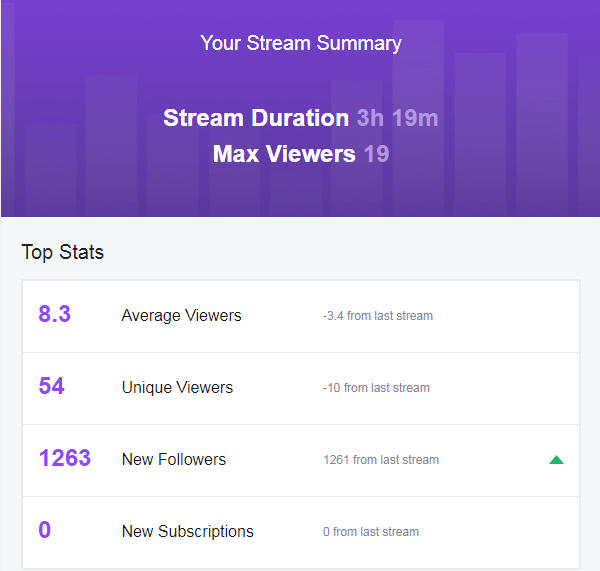
What time did the botting start? Do you know how many followers you had before? Are you aware of any triggering events that may have caused the botting to happen?
-remove alert notifications
The quickest thing you can do if you get follow botted while you are live is remove your alert notifications. If they are a browser source, simply edit the browser source to remove the link and they will stop coming through. Hiding it will not mute it, so I would just remove the link temporarily.
You may also have a chat-bot to disable. If you have the time and composure, you can turn off chat-bot functionality. If you are in a crunch, you can try to time-out or revoke mod privileges from the chat-bot. You can ban it if you have to; you can always unban it later. I updated my settings in StreamElements to quickly disable my chat-bot. Don’t forget, you can clear your chat as well with /clearchat!
-keep your composure
It can be a stressful, adrenaline-rushing situation to suddenly see thousands of follow bots show up all at once. Just remember that you will not get punished because of the actions of another. If it becomes too overwhelming, you can switch to a “be right back” scene and take a break from your stream to deal with these things. If you feel compelled to end your stream because of it, that is your prerogative. It may not stop the follow bots from continuing, but it gives you the privacy to sort through it yourself. At the end of the day, it’s an annoyance, but if you have read this guide, it should be a piece of cake getting through it.
 Cool Gamer Retirement Home
Leave a comment